
Location guides · 2026-10-07 · 2879 words
Mine Map Design Guide: Workings and Hidden Risks
A detailed guide to make an excavated site feel worked and worn, with a worked example, settings, export checks, and practical table tests.
Define the job of the map
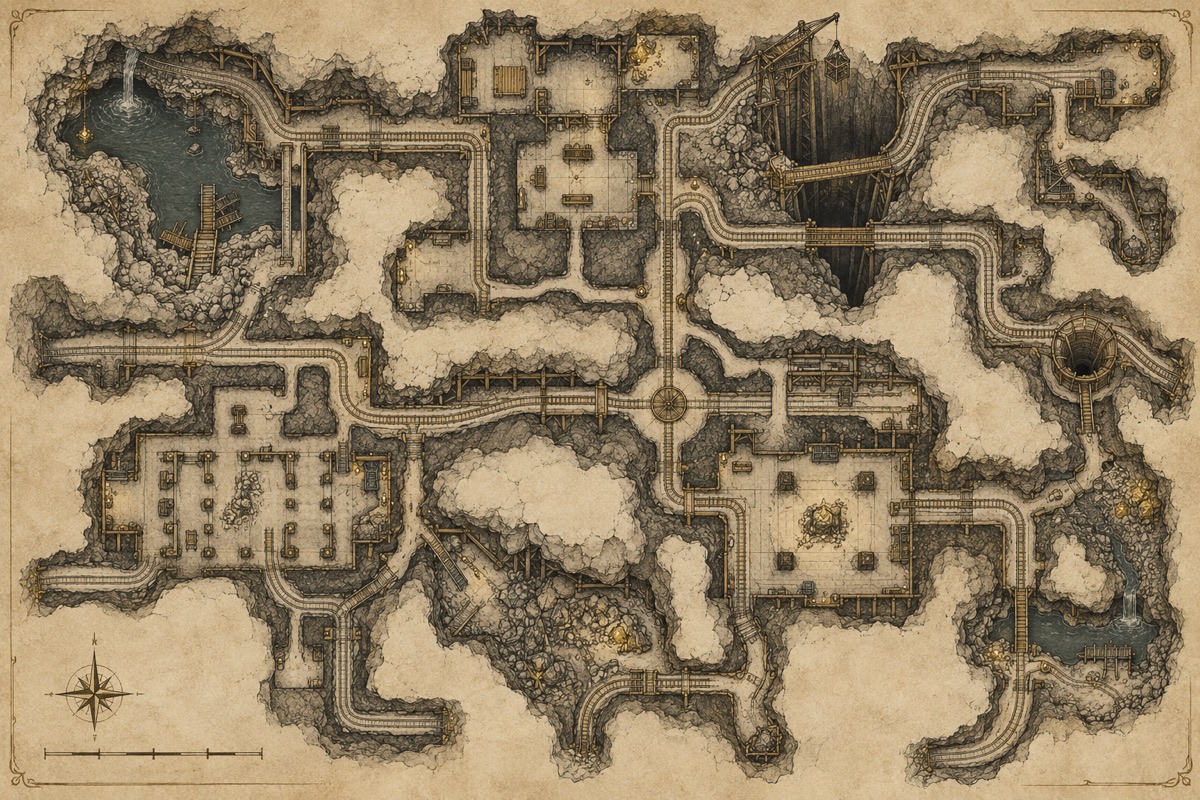
A useful mine map generator starts with decisions at the table, not with decoration. Follow extraction logic rather than placing rooms at random. This guide uses an abandoned silver mine reopened by scavengers as a running example so each recommendation can be tested against an actual location. You will see how to choose a scope, connect spaces, make the layout readable, and produce an export that remains useful when the session begins.
A dnd map creator may create a maze of chambers; a mine works better when routes follow extraction and transport. When preparing an abandoned silver mine reopened by scavengers, test the idea against the actual functions: shaft station, tool room, branching gallery, collapsed face, and ore chamber.
The central question is what the map must help players decide. In an abandoned silver mine reopened by scavengers, the map should show enough structure to understand where a route might lead, yet leave room for discovery. Follow extraction logic rather than placing rooms at random. Write that purpose in one sentence before opening a generator. If a later room, corridor, or icon does not support that sentence, ask whether it belongs on this particular sheet.
A mine map generator is useful when it communicates relationships: which spaces connect, which are separated, where people normally travel, and where trouble might interrupt that travel. The sample location calls for shaft station, tool room, branching gallery, collapsed face, and ore chamber. These are functions, not mandatory labels. Change their names to fit your adventure, but preserve the logic that explains why each space sits where it does. A clear reason is more valuable than a large room count.
Field note: write the map's purpose at the top of your prep page. For an abandoned silver mine reopened by scavengers, the sentence should explain why shaft station, tool room, branching gallery, collapsed face, and ore chamber belong together. It becomes a useful filter when a generated chamber is attractive but has no role in the site.
Choose a scope that fits the session
Scope depends on how long the group will spend in the location. For an abandoned silver mine reopened by scavengers, decide whether the whole site will be explored in one session or revisited over several. Count decisions rather than squares: each branch should offer information, risk, a reward, or a change in route. A short map with several distinct choices can occupy a table longer than a sprawling map of empty rooms.
Use an approximate room budget before generating. Allocate one space for arrival, a few for development, an optional detour, and a destination. The example's essential areas are shaft station, tool room, branching gallery, collapsed face, and ore chamber. Leave breathing space between major moments. If you need a larger site, add a second map or level with a different purpose instead of stretching every corridor merely to fill the canvas.
Time check: count the scenes you expect to play in an abandoned silver mine reopened by scavengers, then leave room for one unplanned detour. If the location has more developed rooms than your available session can support, mark which branch may be shortened without removing the finale.
Start with a believable spatial idea
Imagine how this place was built and used before it became an adventure. An abandoned silver mine reopened by scavengers implies routes for ordinary occupants as well as visitors. Trace a normal day: where would someone enter, store supplies, work, gather, and leave? Put doors and passages along those paths. The result feels more convincing because the geometry explains behavior, not because every wall has a detailed texture. The risk to avoid here is perfectly symmetrical tunnels with no reason for their shape; mark the consequence in your notes before export.
The spatial idea can be simple: a main haulage route plus a narrow ventilation shortcut. This gives you a starting network with a reason to exist. Draw the broad connections first, then place shaft station, tool room, branching gallery, collapsed face, and ore chamber. Keep dimensions approximate until movement works. At this stage you are solving a diagram, so avoid polishing line weight, color, or furniture. Those details are easier to judge once the main route is stable.
A mine grows toward material worth extracting. Main haulage passages should connect shafts and work faces, while narrower side galleries investigate uncertain seams. That asymmetry is more convincing than evenly spaced chambers. For an abandoned silver mine reopened by scavengers, compare this advice with the practical route: a main haulage route plus a narrow ventilation shortcut.
Reality check: trace how an ordinary occupant would travel between shaft station, tool room, branching gallery, collapsed face, and ore chamber. A corridor that only exists to connect two generated shapes is easy to spot when no worker, resident, or visitor would choose it.
Build routes and choices
A good route should support a choice that players can understand. In the example, a main haulage route plus a narrow ventilation shortcut. Ask what is visible at the decision point and what each direction seems to promise. One way may be safer but longer; another may be quicker yet exposed. The map does not need to reveal every consequence immediately, but it should provide enough clues that choosing feels intentional.
Loops are especially useful because they let players return with new knowledge, flank an obstacle, or retreat without simply reversing every step. Add a loop where it fits the location's original use. Avoid making every passage interchangeable. If two corridors connect the same rooms and offer the same sights, hazards, and travel time, either distinguish them or remove one. Readability improves when every connection earns its place. For an abandoned silver mine reopened by scavengers, compare this advice with the practical route: a main haulage route plus a narrow ventilation shortcut.
Route check: follow a main haulage route plus a narrow ventilation shortcut with a pencil from both directions. If the second path changes nothing about access, information, or risk, reshape it until the alternative has a reason to be chosen.
If the mine breaks into natural stone, Cave Map Design Guide: Natural Routes and Chambers helps shape the new area. For another infrastructure map guided by flow, see Sewer Map Design Guide: Channels, Access, and Loops.
Give important rooms a role
Room functions help you improvise. For an abandoned silver mine reopened by scavengers, start with shaft station, tool room, branching gallery, collapsed face, and ore chamber. Give each important space one job in the building and one job in the adventure. A store can explain supplies while hiding a clue; a hall can provide orientation while becoming a confrontation site. This double duty makes the map feel dense with possibility without requiring dozens of chambers.
Not every room needs a fight or puzzle. A quiet chamber can establish history, show a consequence of an earlier event, or provide a place to regroup. Number rooms in your notes so you can find them quickly. If you rename a generated room, keep the number stable across your map and prep document. Consistent references prevent confusion when the group moves quickly or unexpectedly. When preparing an abandoned silver mine reopened by scavengers, test the idea against the actual functions: shaft station, tool room, branching gallery, collapsed face, and ore chamber.
Room check: read the function of each chamber aloud without its number. If two spaces in an abandoned silver mine reopened by scavengers sound identical, combine them or give one a different job. This keeps notes short and descriptions memorable.
Use landmarks and visual language
Landmarks reduce navigation friction. In this guide's example, a lift shaft as an orientation point. It should appear in descriptions before the party reaches it, or be visible from multiple approaches. A landmark can be a large room, odd shape, stair, stream, statue, or opening to another level. The key is distinctiveness: players should be able to say where they are relative to it.
Use a restrained visual language. Make walls, floor, doors, hidden features, hazards, and exits distinguishable at the size the map will actually be displayed. A small legend is better than a crowded set of ornate symbols. If the map is shared with players, hide information they have not discovered or create a separate player version. Clarity matters more than mimicking the style of a published product. The risk to avoid here is perfectly symmetrical tunnels with no reason for their shape; mark the consequence in your notes before export.
Landmark check: point to a lift shaft as an orientation point on a zoomed-out export. If it disappears at the size your players will see, strengthen its shape or contrast rather than adding another label.
Add tension without blocking play
Tension works best when a hazard interacts with a choice. Perfectly symmetrical tunnels with no reason for their shape is a warning sign: it consumes attention without adding useful play. Place a trap, locked route, or encounter where the group can notice clues, evaluate alternatives, and decide what to do. A hazard that appears without warning and blocks the only route is usually less interesting than one that changes the cost of a known option. The risk to avoid here is perfectly symmetrical tunnels with no reason for their shape; mark the consequence in your notes before export.
Consider how the location responds to movement. Sound may travel through a main haulage route plus a narrow ventilation shortcut; a guarded space may overlook a lift shaft as an orientation point; an exit may be easy to reach but hard to use. Mark these relationships in short notes beside the map. They help you run the site consistently even when players act in an unexpected order. Keep essential progress possible without assuming a single solution.
Hazard check: test whether the risk can be recognized before it matters. In an abandoned silver mine reopened by scavengers, avoid perfectly symmetrical tunnels with no reason for their shape. Put evidence near a decision point and let players choose how to respond.
Make a worked example
For a worked example, sketch an abandoned silver mine reopened by scavengers as a set of connected functions rather than a finished illustration. Begin with shaft station, tool room, branching gallery, collapsed face, and ore chamber. Put the entrance where arrival makes sense, then choose a destination whose distance feels appropriate for the session. Add a main haulage route plus a narrow ventilation shortcut. Finally, place a lift shaft as an orientation point where it can help players orient themselves. You now have a playable graph even before choosing a theme.
Run three imaginary turns. First, the party enters and sees two plausible directions. Second, they explore an optional room and learn something that changes the meaning of the main route. Third, they approach the destination from either direction of the loop. If the choices sound indistinguishable, adjust one route. If the map requires a scripted sequence to work, loosen a connection or move a clue. For an abandoned silver mine reopened by scavengers, compare this advice with the practical route: a main haulage route plus a narrow ventilation shortcut.
A collapse changes both movement and information. It can block the obvious route, reveal an older working, or force attention to ventilation. Make the consequence visible on the map instead of treating the rubble as decoration. When preparing an abandoned silver mine reopened by scavengers, test the idea against the actual functions: shaft station, tool room, branching gallery, collapsed face, and ore chamber.
Example check: imagine a group entering an abandoned silver mine reopened by scavengers after missing your planned clue. Can the map still support a route toward a lift shaft as an orientation point? If not, move a hint to a place that can be reached by more than one approach.
Translate the plan into generator settings
Open the relevant generator with a size that matches the room budget. For an abandoned silver mine reopened by scavengers, generate a medium draft before trying a huge canvas. Set room count near the number of meaningful spaces you planned. Choose straight corridors for deliberate architecture or organic ones for excavated and natural sites. Turn on loops when the route diagram benefits from a return path, and use secret rooms only for optional discoveries.
Treat a seed as a version of the generated layout. Write down the seed and settings together, then make a new seed only when you want a different arrangement. Switch visual themes without changing geometry to compare readability. The current tool allows quick cell and symbol edits, then PNG, SVG, and JSON exports. A share URL reproduces generated settings and layout; manual edits belong in your exported file, so save that file separately. When preparing an abandoned silver mine reopened by scavengers, test the idea against the actual functions: shaft station, tool room, branching gallery, collapsed face, and ore chamber.
Settings check: generate three seeds with the same room count and compare only the connections. Keep the version where a main haulage route plus a narrow ventilation shortcut reads most clearly; a prettier silhouette is less useful if travel becomes confusing.
To test the route and room choices in this guide, open the mine map generator and compare a few seeds. Keep the version that helps you make an excavated site feel worked and worn.
Review common mistakes
The most common error is perfectly symmetrical tunnels with no reason for their shape. It often looks acceptable while zoomed in, yet becomes obvious when you trace the route from the entrance. Another error is adding too many symbols before the room network is stable. Remove decorative marks temporarily and see whether walls, paths, and doors still communicate the plan. If not, fix geometry first.
Check every doorway at the map's real use size. A narrow gap may vanish in print; a secret symbol may be too prominent on a player handout. Verify that optional spaces remain optional, that a hidden route does not contain the only required clue, and that the final room is reachable. For encounter maps, also check movement width and sightlines. For exploration maps, check that players can form a useful mental picture. The risk to avoid here is perfectly symmetrical tunnels with no reason for their shape; mark the consequence in your notes before export.
Revision check: identify one thing you will remove before adding anything. For an abandoned silver mine reopened by scavengers, that may be a redundant room, a decorative symbol, or a corridor that duplicates a main haulage route plus a narrow ventilation shortcut without creating a new choice.
Prepare the map for screen and print
Export for the medium you will use. If the map is projected or loaded into a virtual tabletop, start with a high-resolution PNG and inspect the grid at actual display scale. If it will be printed, choose a printer-friendly theme and test one page before producing a full set. SVG remains sharp when enlarged, while JSON preserves structured map data for your own notes or future tooling. The risk to avoid here is perfectly symmetrical tunnels with no reason for their shape; mark the consequence in your notes before export.
Keep a game-master copy and, when needed, a player copy. The game-master version can retain room numbers and hidden marks; the player version should reveal only what you intend. Put the seed in your notes rather than across the visible play area unless it is useful to the group. Name exported files consistently so a revised map cannot be confused with an older one. In the running example, a lift shaft as an orientation point gives that decision a visible reference point.
Export check: open the downloaded file, not just the editor preview. Confirm that a lift shaft as an orientation point, doors, and room numbers remain legible at the actual display or paper size you intend to use.
Test at the table and revise
Before the session, start at the entrance and trace each important room. Confirm that a main haulage route plus a narrow ventilation shortcut is navigable and that a lift shaft as an orientation point appears when your notes say it does. Try one unconventional player choice, such as retreating, bypassing a guarded space, or approaching the final area by a secondary path. The map should support that choice without requiring an emergency rewrite.
After a test, revise only what caused friction. If players could not tell two passages apart, add a landmark or different room function. If the site felt too linear, add a connection with a clear cost. If it took too long, remove a low-value room rather than shrinking every scene. The goal is to make an excavated site feel worked and worn; a map succeeds when it helps the table make and understand choices.
Table check: hand the map to someone who does not know an abandoned silver mine reopened by scavengers. Ask them to point out the entrance, a secondary route, and a likely destination. Their hesitation reveals layout problems your own familiarity may hide.
Final review questions: Does the map show why shaft station, tool room, branching gallery, collapsed face, and ore chamber belong together? Can someone reach the destination without guessing an invisible mandatory secret? Does a main haulage route plus a narrow ventilation shortcut create a real alternative? Is a lift shaft as an orientation point recognizable from the play distance? Have you saved a usable export and the seed? If those answers are clear, stop polishing and prepare the descriptions and consequences that make the location come alive.
Put it into practice
Try the Mine Map Generator and save the ideas that fit your campaign.